MODULE #1: Object Oriented Applications with Java
Overview
As explained in the introduction, the project's goal is to learn to design and develop a complete application using object oriented programming in Java.
This first module will focus on: inheritance, arrays and exceptions.
Classes and Inheritance
The first step in creating any application is the design of data model. In the area where you are is the design of the classes in your program.
In this module you have to implement the class hierarchy that models the information handled by your application.
You must satisfy the following requirements:
-
The hierarchy must have at least 3 levels of inheritance, with at least 8 classes in total.
-
Classes must have attributes of at least three different types (String, boolean, numeric, others).
-
Attributes should have their corresponding access methods.
-
The root class of the hierarchy must define an
equalsmethod and anothercompareTomethod that allows to compare and sort objects. As the class includes thecompareTomethod, define this class as an implementation of the interfaceComparable. -
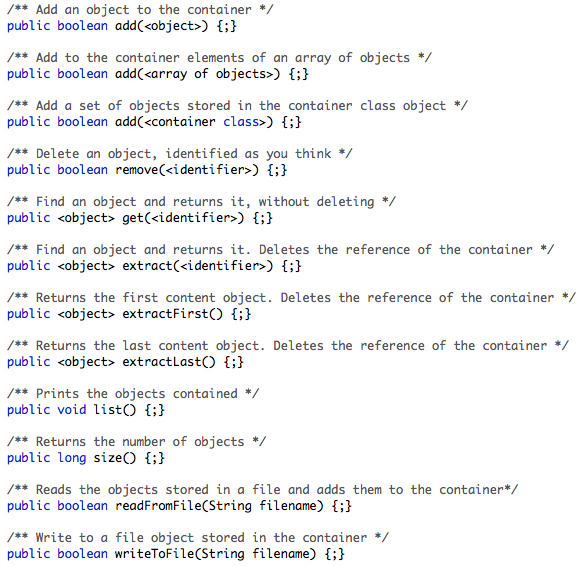
Write an abstract class that stores objects of other classes with the following methods (abstract or not, you decide each method's type):
-
Implement a class that inherits from the previous class and makes an actual implementation based on an array of objects.
-
You write a class derived from
Exception(name it as you like) to be launched by the above methods (if they can cause an error). -
All classes must include a
toString()method that returns a string representation of the object, to allow to print its value on the screen or into a file. -
You must have a global application class, to test all previous methods.
Example of classes
In our example application, we would have the following class hierarchy:
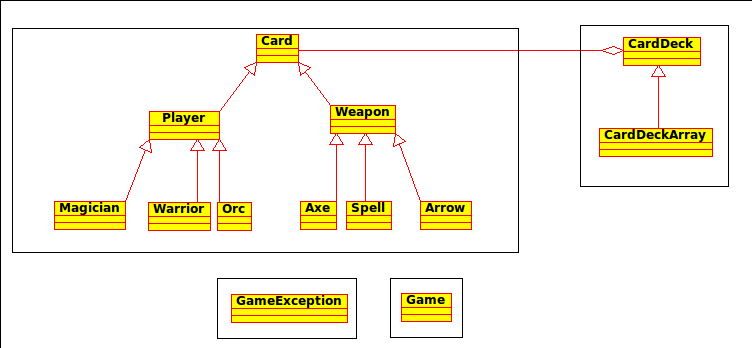
The Card class and its children represent a playing card. Each card has its own
character, color, strength, etc. The compareTo method is used to sort them by strength and then by type.
The CardDeck abstract class represents a deck of cards a player. The CardDeckArray class implements the deck of cards as an array. In addition to the
player's name as an attribute contains an array of Card objects.
readFromFile and writeToFile methods read and write in a text file.
The values of the text file are separated by tabs. The first columns is the class of the object and
then there are the values for attributes os classes.
Game is the application class. In this first module creates a number of different card
decks to evaluate the code developed.
GameException class represents the exception that can be launched from the different
methods and constructors.