Eyegrade: grading multiple choice exams with a webcam
Eyegrade uses a webcam to grade multiple choice question exams. Needing just a cheap low-end webcam, it aims to be a low-cost and portable alternative to other solutions based on scanners.
News
 Subscribe
| Read more news at the blog
Subscribe
| Read more news at the blog
[Jan 17, 2022] Eyegrade 0.9 has been released! See the blog post or go to the downloads page.
[Mar 29, 2019] Eyegrade 0.8.1 has been released! See the blog post or go to the downloads page.
[Jan 25, 2018] A user from Vietnam has contributed with a nice video tutorial. It's linked from the documentation page. See the blog post.
Main features
The main features of Eyegrade are:
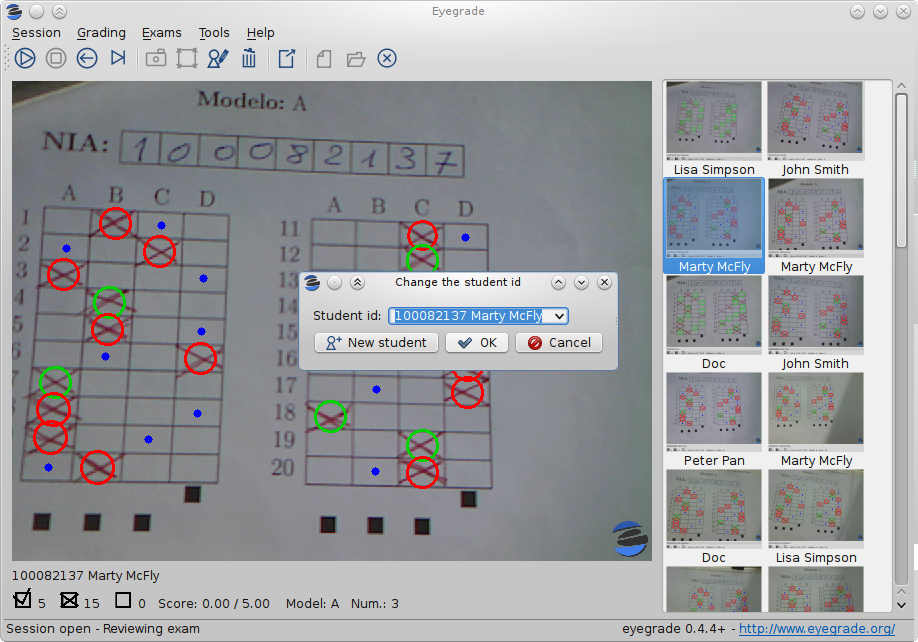
- Grading the exams: By using a webcam, the graphical user interface of Eyegrade allows you to grade your exams. Eyegrade is able to recognize not only the answers to the questions, but also the identity of the student by using its hand-written digit recognition module. The whole process is supervised by the user in order to detect and fix potential detection errors.
- Exporting grades: Grades can be exported in CSV format, compatible with other programs such as spreadsheets.
- Typesetting the exams: Although you can create your exams with other tools, Eyegrade integrates an utility to creating MCQ exams. It is able to create your exams in PDF format. Eyegrade can automatically build several versions of the exam by shuffling questions and the choices within the questions.
Here is a short demonstration video of an early version of Eyegrade. Please note that the user interface has been greatly improved since then:
And here is a more current screenshot:
Trying Eyegrade
Eyegrade has been used in several courses at Universidad Carlos III de Madrid since 2010, as well as in other institutions worldwide. Follow the quick start guide if you want to give it a try.
How can you contribute?
Eyegrade is free software, licensed under the terms of the GNU General Public License (GPL) version 3 or any later version.
The source code of Eyegrade is hosted at Github: jfisteus/eyegrade. Bug reports, feature requests and pull requests are welcome there.
How can you cite this work from academic papers?
An article describing Eyegrade has been published by the Journal of Science Education and Technology:
Jesus Arias Fisteus, Abelardo Pardo and Norberto Fernández García, Grading Multiple Choice Exams with Low-Cost and Portable Computer-Vision Techniques. Journal of Science Education and Technology. doi:10.1007/s10956-012-9414-8
Please, cite the paper if you use Eyegrade for research activities.